Description
UserAgent-Spy is a WordPress plugin which displays the user's Operative System and Web Browser in the comments. It uses the comment->agent property to access the UserAgent string, and through a series of regular expresions, detects the O.S. and browser. Then it shows a message with an icon of the browser and O.S.
Your feedback is very important, new features have been added by request, so if there’s something you would like to see in UA-Spy, leave a comment, and I’ll see what I can do. If you want to contribute code, images, or whatever you think may be useful to UserAgent-Spy, write a comment below or drop me an e-mail (fernando at picandocodigo.net).
Donate to the development of the plugin:
Screenshot:
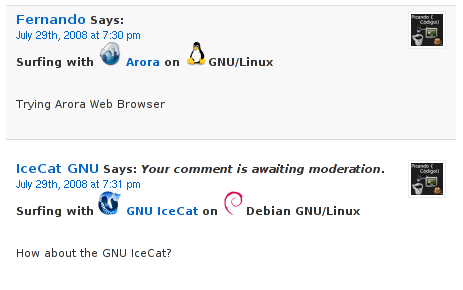
UserAgent Spy on WordPress 2.6 default theme
Installation:
- Upload useragent-spy folder to /wp-contents/plugins/
- Login to your WordPress Admin menu, go to Plugins, and activate it.
- In your WordPress Admin menu, you will find a new menu under Settings called UserAgent Spy. There you can choose the displayed icons size, and select where to display the plugin. There are three options for displaying the plugin:
- Before the comment text. User's WebBrowser and OS will be displayed before comment text.
- After the comment text.User's WebBrowser and OS will be displayed after comment text.
- Custom (Advanced). You can specify the location using the useragent_spy_custom() function inside the comments loop in your template (Generally in comments.php).
Example:
<?php foreach ($comments as $comment) : ?>
<cite><?php comment_author_link() ?></cite> <?php useragent_spy_custom(); ?> says:<br />
<?php comment_text() ?>
CAUTION: If you select "Custom" and don't use <?php useragent_spy_custom(); ?> in your template, you won't get the information displayed.
Features (Check Release Notes below to see new features being added)
- Detects most popular web browsers and Operative Systems (It's a work in progress, many more browsers/o.s. 's to come)
- Shows browser icon, name, and a link to the browser's homepage (this will be customizable in future versions).
- Shows browser/os in the comments management page (unless using "custom" option).
- Customizable, has its own Options Page where you can change the size of the browser/o.s. icon, and where you want it to be displayed.
- Published under GPLv3
Some of you may compare this to another well-known plugin named browsersniff. UserAgent-Spy is written completelly from scratch, with several improvements over browsersniff:
- Easy standard installation, just upload to wp-plugins and activate it.
- Customizable options.
- No basic knowledge of PHP or editing WordPress templates required
- Published under GPLv3.
66 comentarios en este post - Feed de comentarios
-
WordPress Plugin Releases for 08/19 » Weblog Tools Collection » Blog Archive |
19 agosto. 2008 - 16:10
[…] UserAgent-Spy […]
-
WordPress Plugin Releases for 08/19 | Wordpress Blog NL |
19 agosto. 2008 - 18:50
[…] UserAgent-Spy […]
-
Weblog Tools Collection: WordPress Plugin Releases for 08/19 : AllFeedz |
21 agosto. 2008 - 08:30
[…] UserAgent-Spy […]
-
[17] ???? ??????? ??? WordPress (2) |
21 agosto. 2008 - 11:32
[…] UserAgent-Spy ?? ???? ????? – “????” ???? ??????? ? ?? ? ?????? ?????, ? ???? ?? ? ?????????, ????? ? ???? ??????. ??????? – ????? ? ?????? ?? ????????, ??? ???? ? ??? ?????????? ???? – ??????? ????? ????????. […]
-
Weblog Tools Collection: WordPress Plugin Releases for 08/19 | Life Journey |
21 agosto. 2008 - 11:38
[…] UserAgent-Spy […]
-
Tarde programando PHP para WordPress | Picando Código |
23 agosto. 2008 - 23:59
[…] PHP. Se ha vuelto bastante entretenido la programación para WordPress. Tengo los dos plugins: UserAgent-Spy y List Category Posts en […]
-
WordPress Plugin Releases for 08/19 · Softonix.com |
26 agosto. 2008 - 02:27
[…] UserAgent-Spy […]
-
WordPress Plugin Releases for 08/19 | BlogBroker24-7 |
27 agosto. 2008 - 17:49
[…] UserAgent-Spy […]
-
WordPress: Posts of Note, August 2008 | BlogWell |
2 septiembre. 2008 - 05:10
[…] UserAgent Spy WordPress plugin UserAgent-Spy is a WordPress plugin which displays the user’s Operative System and Web browser in the comments section. […]
-
?WordPress???Google Chrome |
14 septiembre. 2008 - 05:39
[…] ?????????????????Chome???UserAgent-Spy??????????????????????????????????????????????????????????????????????????????????? […]
-
Browser Sniff Plugin Detects more Browsers and Operating Systems - Dani Iswara .Net |
9 mayo. 2009 - 04:38
[…] UserAgent-Spy WordPress Plugin (English) by picandocodigo.net. […]
-
UserAgent-Spy review, discussions, does it work, and ratings on Loadwp.com | Loadwp.com |
17 agosto. 2011 - 19:41
[…] No questions yet. Got any question? https://picandocodigo.net/programacion/wordpress/useragent-spy-wordpress-plugin-en/ […]




fernando 29 julio. 2008 - 20:46
You can see the plugin at work right here!
Pablo 29 julio. 2008 - 21:01
Just trying it on Firefox / Ubuntu Linux
francisco 30 julio. 2008 - 04:17
mmmm, nice work
Chip Bennett 22 agosto. 2008 - 21:14
I’m a Broswer Sniff user; just testing my Kubuntu/Firefox UA with UA-Spy. I think Browser Sniff uses a lot of memory, so I’m always open to something more lightweight!
fernando 22 agosto. 2008 - 21:17
Chip:
Hope you like UA-Spy. I’m really open for feature requests, ideas, and opinions.
Tell me if you made the switch!
Regards
Chip Bennett 23 agosto. 2008 - 02:15
Hola Fernando!
One thing I would *really* like to see, is the ability to display *only* the icons (that is, no text, just icons).
That feature alone would get me to switch in a heartbeat!
I’ve installed the plugin, but haven’t had time to play around with it yet. I’ll try it out shortly, though.
Chip Bennett 23 agosto. 2008 - 12:17
Hola Fernando,
I’m trying out the plugin, but have two issues:
1) The images are not displaying. I have the icon size set to 16, but the SRC string being printed by the function is 40 – that is, the function returns an image SRC like *siteurl*/plugins/useragent-spy/image/40/net/firefox.png – and of course, the /image/40/ directory doesn’t exist.
I can’t find anything in the plugin or options files that would be causing this behavior.
(Side note: reading through the code in the plugin’s PHP file, there is a comment that useragent_spy_custom() is deprecated, and that useragent_spy() should be used instead. Your instructions still indicate to use the former function. Both seem to work identically. Which is correct?)
2) Can you add an option *not* to display the full UA string in the comment when logged in as administrator? It breaks my comment layout. (Perhaps add it as hover text, instead?)
Chip Bennett 23 agosto. 2008 - 12:47
Another update – I have it working, but with a couple of ugly-hack fixes:
1) I have copied the 16px icons into a “40” directory, in order to make the SRC printed by the function to be valid.
(Please take a look at the source for one of my posts with comments, in order to see what I’m talking about on this one.)
2) I have commented out the line that prints the UA string if logged in as administrator.
Another thing (though I notice it is commented as “TO DO”) – saved settings are not displayed on the settings page.
fernando 23 agosto. 2008 - 18:37
Chip:
I’m rolling out 0.5 version of UserAgent-Spy today. It’s a major update, with several fixes, including the option to not display full UA string among others.
I’ll update this page as soon as it’s up.
Thanks for your feedback, the ability to display *only* the icons has been implemented!
Regards
fernando 23 agosto. 2008 - 20:43
Version 0.5 is out, with some major changes 😀
Chip Bennett 24 agosto. 2008 - 02:17
I just updated to Version 0.5; great stuff!
I still have the issue, though, of the plugin trying to set the icon IMG SRC as /plugins/useragent-spy/image/40/ directory, when it should be /plugins/useragent-spy/image/16/ (I have the icon size option set to 16.)
Any clue what might be causing that?
Otherwise, everything is great! It displays exactly the way I’ve been wanting it to!
Thanks!
Chip Bennett 24 agosto. 2008 - 13:16
Fernando,
Still trying to figure out why UA Spy seems to think that I’m setting the icon size to “40”.
Could it be an issue with the global variable $size? Could something else (perhaps another plugin?) be using the same global variable?
I might try more ugly hacking, and change $size to $uasize, or something, and see if the correct icon size setting gets passed to the function.
Chip Bennett 24 agosto. 2008 - 13:22
Fernando,
Changing $size to $uasize seems to have worked.
Now, when I have the setting at “16”, the function correctly links to the 16px icon directory (likewise with the “24” setting).
(By the way, those 24px icons are gorgeous!)
fernando 24 agosto. 2008 - 21:30
Chip:
Thanks a lot.
I’ll change the name of the variable for future releases, as it’s pretty generic, and the same problem could happen again. That was my bad. I’ll commit 0.5.1 with that fix, and anyother bug that comes up these days.
Glad you liked the new stuff. Your idea of displaying icons only was great, I’m using it on my blog as well as you can see.
giovanealex 2 septiembre. 2008 - 19:46
Google Chrome, Google’s browser, was just released – it would be nice to see this plugin dectecting it too.
fernando 2 septiembre. 2008 - 19:52
giovanealex:
Check for an update tonight.
I’ll upload a new version with Chrome detection.
Regards
fernando 3 septiembre. 2008 - 00:26
Done, the plugin now detects Google Chrome.
Your WordPress should ask you to update the plugin soon, since it was just uploaded.
albertux7 3 septiembre. 2008 - 16:37
La version 0.5.1 no contiene imagenes ( el “upgrade automatic” borra la carpeta img/ )
solo basta copiar la carpeta img de la version anterior
Saludos
fernando 3 septiembre. 2008 - 20:02
Gracias albertux, ya está arriba la versión 0.5.2, con ese bug y otro fix arreglados.
Saludos
Montblanc 14 septiembre. 2008 - 22:41
Thank you! It works as a charm! 😉
Montblanc 14 septiembre. 2008 - 22:44
Tried to switch user-agent. Delete this comment if you wish.
Montblanc 14 septiembre. 2008 - 22:45
Trying with Kubuntu.
kirksydney 16 septiembre. 2008 - 11:22
Nice work! So easy to install unlike the other plug in that I saw awhile ago. However, I hope you could make it more specific. Meaning what version of browser (eg: Mozilla Firefox 3.0, Internet Explorer 7.0, etc etc.) And what version of OS (eg: Windows XP, Windows Vista, etc etc.)
Just like in this plug in: http://priyadi.net/archives/2005/03/29/wordpress-browser-detection-plugin/
Too bad, the author of that plug in didn’t make easier installation as you did.
Also, please make the icons transparent. It looks awkward on my black background when using Internet Explorer.
Thank you so much.
fernando 16 septiembre. 2008 - 18:46
kirksydney:
Version numbers will be included in a future release. As soon as I get the time to implement it.
The icons ARE transparent, they are transparent PNG. Internet Explorer doesn’t support transparency for PNGs on version 6, which pretty much sucks, so you just shouldn’t use Internet Explorer, for your own good. And for everyone else’s good. Update your browser.
Thanks!
Regards
kirksydney 19 septiembre. 2008 - 02:35
I hope that “future release” would be anytime soon. Thank you for replying and for this awesome plug in. Looking forward to that update. More power.
By the way, why am i getting this on my previous comments:
Using [Unidentified browser (yet)] Unidentified browser (yet) on [Unknown O.S.] Unknown O.S.
Example link: http://kirksydney.com/2008/09/ang-epektibong-suob/
Please take a look at it. 😀
kirksydney 22 septiembre. 2008 - 05:39
Hi,
What I did instead was I assigned Firefox and Windows as the default browser and OS so I got my problem resolved.
I hope the version numbers coming out very soon, though. ;D
kirksydney 16 noviembre. 2008 - 13:15
Just revisiting here to say that I appreciate the little update you did. Although the changes that I can only see is the Internet Explorer version numbers. Hope you could do the same with the rest of the browsers, and with the Operating Systems as well. Thank you so much.
fernando 16 noviembre. 2008 - 15:35
kirksydney:
Great decision to make Firefox your default web browser.
Other browsers and O.S.’s versions will be included too. I just need some time to dedicate to my other WordPress Plugin which hasn’t been updated for a while.
Thanks for using UserAgent-Spy.
kirksydney 18 noviembre. 2008 - 15:05
Great! I’ll look forward to that. 😀
Chip Bennett 14 diciembre. 2008 - 10:03
Fernando,
I’m still loving this plugin; thanks again for your great work.
I just updated to WP 2.7, but haven’t yet implemented the new commenting features. One of the main reasons is that I’m unsure how to incorporate your plugin into the new wp_list_comments function.
Any thoughts/ideas? Do you have UA-spy working with wp_list_comments in WP 2.7?
fernando 14 diciembre. 2008 - 13:30
Chip:
I haven’t yet updated the plugin to be compatible with the new version of comments. Apparently there’s some new work to do to support the new threaded comments.
That’s one of the reasons why I haven’t yet updated my blog to WP 2.7.
But I’ll get to it any time soon.
Regards
dani 22 diciembre. 2008 - 11:05
nice plugin fernando, better if it support x/html & accessibility too 🙂
fernando 5 enero. 2009 - 01:13
dani:
I’ve already fixed support for xhtml on version 0.6, I think it’s working fine now. What do you mean by accesibility?
Regards
Igneous 2 febrero. 2009 - 11:32
Hello Fernando, I really like this plugin, and I really appreciate that you took the time to write it, but unfortunately it does not work with WP 2.7, so I am unable to use it. Are you planning on trying to fix it, or is this now a dead project?
fernando 2 febrero. 2009 - 21:33
Igneous:
This project is far from abandoned. I just haven’t had the time to make it work with WordPress 2.7. It’s really demotivating, since a lot was changed in 2.7, but I’ll get to it soon.
Glad you like the plugin, I’ll try to get it to work with new WordPress.
Regards
Igneous 3 febrero. 2009 - 00:03
Fernando: Thank you! I would be greatly endebted to you if you were to get it working with WP 2.7. Also, if you ever need a beta tester before you take it public, be sure to send me an email, I’d be more than happy to help 🙂
V-Teq 12 febrero. 2009 - 13:47
Really nice plugin! I like it very much, thanks!
But I’m also curious about support for CentOS recognition, I found it not working on my site (using a CentOS from my university).
V-Teq 12 febrero. 2009 - 13:50
Back to previous comment:
The user-agent string for CentOS (that was not recognized) was like:
Mozilla/5.0 (compatible; Konqueror/3.5; Linux) KHTML/3.5.4 (like Gecko) CentOS/3.5.4-13.el5.centos
fernando 19 febrero. 2009 - 19:47
New version is out: 1.0rc1. That’s release candidate 1. If everything works fine, version 1.0 final won’t be too far away.
CentOS detection included.
Still needing to port it to WP 2.7 thought, that’s the next milestone on my book…
Regards!
fernando 3 marzo. 2009 - 22:44
Version 1.0rc2 is out. Working perfectly on WordPress 2.7.1 (this blog)…
V-Teq 21 marzo. 2009 - 17:23
Nice work, Fernando! 🙂
..now testing from Bon Echo.
fernando 24 marzo. 2009 - 23:32
Thanks V-Teq, BonEcho being detected and shown with its logo…
By the way, you should update your browser!
Regards
dani 7 mayo. 2009 - 13:10
fernando,
it sounds ugly if screen reader/voice browser users must hear the inline UA string too.
V-Teq 8 junio. 2009 - 21:24
Just testing Google Chrome 3 (unstable) for Linux.
sandrar 10 septiembre. 2009 - 12:39
Hi! I was surfing and found your blog post… nice! I love your blog. 🙂 Cheers! Sandra. R.
Rajiva 13 diciembre. 2009 - 07:49
Thank’s for share. I must learn how that plugins work..
Hugh 4 enero. 2010 - 21:48
I love your plugin. I have been using k2 and wp since 2005. When I updated to k2-rc8 a few months ago your plugin hides all the comments and does not show the browser feedback.
I would like to continue using your plugin if possible.
Using WP 2.9
mua sam vui 25 junio. 2011 - 02:34
i am just make sure …
jam 25 junio. 2011 - 02:35
and this is the good plugin ! but not full jet !
Hatiyah 23 noviembre. 2011 - 22:19
useragent-spy nice for detect browser and os
ppsalama 28 diciembre. 2011 - 18:23
probando…
ppsalama 28 diciembre. 2011 - 18:33
está muy bien… lo instalaré en mi blog
gracias
pepehillo 28 diciembre. 2011 - 18:59
¿tiene soporte para SRW Iron?
gracias
ilyas 22 noviembre. 2014 - 01:08
thanks